


Boomplay: Music & Live Stream
4.35.08K Reviews
App Specs
- Version
- 7.7.61
- Updated On
- License
- Free
- Downloads
- 100,000,000+
- Developer
- Transsnet Music Limited
- Categories
- Music & Audio
- Platform
- Android, iOS
Screenshots
 Analysis by AppCompare
Before I open a music app, I usually have a practical question in mind: can I find something worth hearing now, then keep it available when my connection drops? That is the kind of everyday need that makes Boomplay: Music & Live Stream appealing. It brings music discovery and offline listening together, with live content and artist-focused features for listeners who want more than a quick search and a play button.
Discovering a World of Music
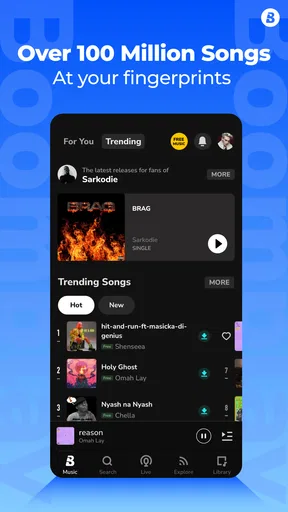
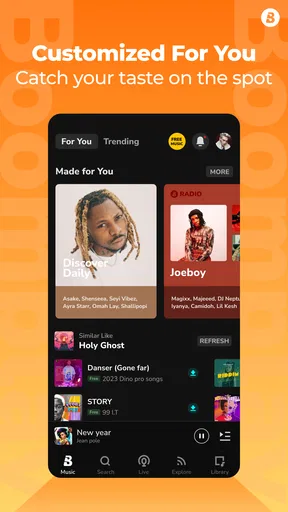
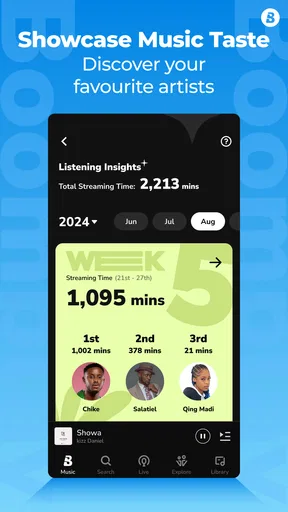
First things first, the app’s interface is pretty sleek. Navigating through Boomplay: Music & Live Stream is as smooth as your favorite track. As soon as you open the app, you’re greeted with a personalized feed that’s all about you and your music taste. The more you use it, the better it gets at recommending tunes you’ll love. It’s like having a DJ in your pocket who knows your vibe.
Playlists & Recommendations
Let’s talk playlists. Boomplay doesn’t hold back. You can find curated playlists for every mood, genre, and occasion. Whether you’re looking to get pumped for a workout or chill out after a long day, the app has you covered. And if you’re feeling adventurous, the ‘Discover’ section is where you’ll stumble upon tracks you didn’t know you needed in your life.
One thing that really stands out is the variety of music genres available. From Afrobeats to pop, and hip-hop to alternative, it’s like a global music festival at your fingertips. The app’s library is constantly updated, so you’re always in the loop with the latest hits.
For a more useful discovery routine, I’d treat the home feed as a starting point rather than a complete picture of my taste. If a recommendation catches my ear, I can follow that thread by searching for the artist or opening Discover, instead of letting one playlist decide the next hour. That small habit helps balance familiar favorites with new finds, especially when I’m listening in the background and don’t want to keep skipping tracks.
Making the App Fit an Ordinary Day
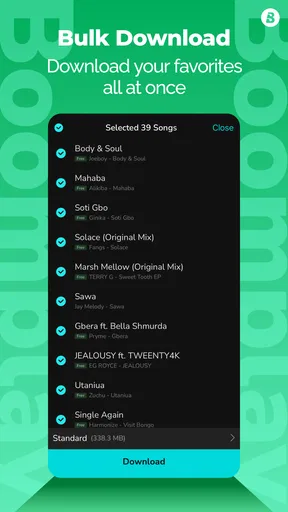
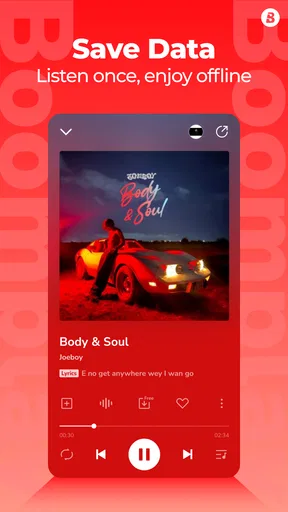
A realistic workflow might start at home, where I use Wi-Fi to look for a few tracks or playlists suited to the day. Before heading out, I’d download the music I expect to want, then switch to those saved tracks during a commute or while running errands. The handoff matters: discovering music uses a connection, while offline playback is what keeps the listening session going through a tunnel, a weak signal, or a data-conscious stretch.
Downloads work best when I think ahead instead of waiting until I’m already offline. I’d also make a small, deliberate selection rather than trying to save every interesting recommendation; that makes it easier to choose something quickly later and avoids filling my listening time with a long, unfocused queue. If I’m preparing for a workout, for example, I can collect energetic tracks in advance, while a quieter selection can be ready for a ride home.
Worth Reading Before You Choose

Switching to Android Auto Means Rethinking Your Driving Routine

Google Calendar Makes a Crowded Week Easier to Manage

Baby Panda World Brings Quick Play to Modern Phones, but Its Game Library Feels Busy

ESPN’s Live Game View Makes Following Close Games Easier

QuizzLand Review: A Good Fit for Short Trivia Breaks, Not Every Player

Basketball Stars: Multiplayer Is Fast, but Can It Recover When Matches Go Wrong?
Live Streaming & Social Features
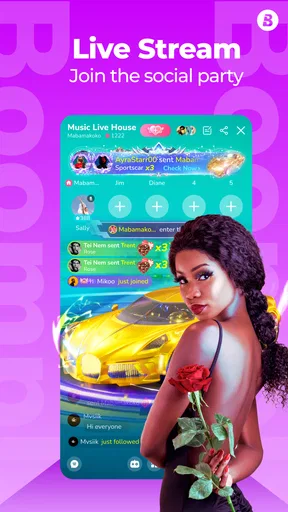
Now, here’s where it gets interesting. Boomplay isn’t just about playing tracks; it’s also about experiencing music live. The live stream feature lets you catch performances and events in real time. It’s like being at a concert without the hassle of travel. Plus, you can connect with other fans and share your thoughts, making it a social experience.
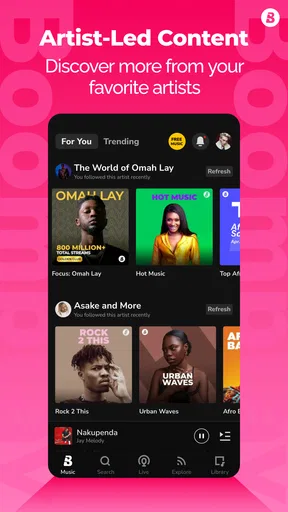
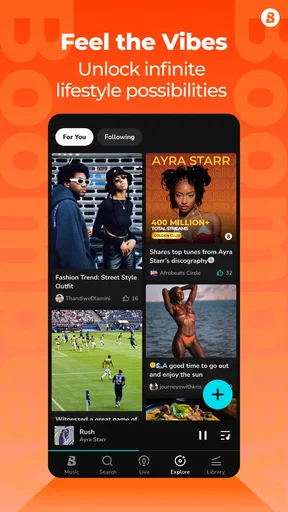
The app’s social aspect is pretty cool too. You can follow your favorite artists and get updates on their latest releases and upcoming gigs. It’s a great way to feel more connected to the music scene and your idols.
These features serve a different purpose from a saved playlist. Following an artist is useful when I want to keep up with that person’s activity, while a live stream is something I’d set aside time to watch or listen to rather than treat as background music. The switch from private listening to a shared event gives Boomplay a more community-oriented feel than a basic player, though it also means the social and live side will matter much more to some listeners than to others.
Offline Listening & Subscriptions
Here’s a lifesaver: offline listening. We’ve all been there—stuck in a dead zone with no signal. Boomplay lets you download your favorite tracks for offline play, so you’re never without your music. Perfect for those long commutes or flights where Wi-Fi is just a dream.
The app offers a range of subscription options, giving you the flexibility to choose what suits your needs. Whether you’re a casual listener or a hardcore music junkie, there’s a plan for you. And with a premium subscription, you can enjoy an ad-free experience and unlimited skips.
There is a useful distinction between browsing and listening here: offline access helps once you have chosen and saved music, but it is not a substitute for planning what you want to hear before losing your connection. I’d use connected time to explore, then rely on downloads for predictable situations such as travel or a spotty commute. That approach is less frustrating than opening the app without service and expecting every discovery feature to work just as it does online.
Who Will Get the Most from It
I think Boomplay is a particularly good fit for someone who wants one place to explore a wide range of music, follow artists, and prepare listening for offline stretches. Its focus on discovery can be appealing if your habits are broader than replaying the same albums, and the live side adds another reason to check in beyond building a queue. The app is free to start, while in-app purchases range from $0.49 to $299.99 per item, so I’d review any purchase options carefully and choose only if they match how I actually listen.
If I mainly wanted a minimalist player for music already stored on my phone, a dedicated local library player would be a more direct fit. Likewise, someone who cares most about a particular streaming service’s exclusive catalog or a tightly integrated ecosystem may prefer that service. Boomplay’s stronger case is its combination of discovery, offline listening, and artist or live content—not a promise that it will be the best match for every listener.
User Experience & Design
From a usability standpoint, Boomplay is pretty intuitive. The design is clean, and everything is just a tap away. The app runs smoothly without any major hiccups. Plus, it’s available on both Android and iOS, so no one’s left out of the fun.
The search function is robust too. Whether you’re looking for a specific artist, album, or track, it gets you there quickly. And if you’re in the mood for a surprise, the random play feature is a neat little touch.
Search is most helpful when I already have a name in mind; for an open-ended mood, a curated playlist or Discover is a better handoff. I’d also keep expectations practical when using a streaming app on the move: a saved selection is more dependable than repeatedly searching while the connection is unreliable. If I’m choosing music for someone else, searching for a known artist or track gives a clearer starting point than assuming the recommendations will match another person’s taste.
Where the Flow Can Break
The main trade-off is that the app brings several listening modes together, so not every screen will be equally useful to every person. If I only want to press play and avoid feeds, artist updates, or live content, those extra discovery paths may feel like clutter rather than value. Recommendations can also take time to become personally useful; I wouldn’t judge the app from a single session, but I would move on if its suggestions continue to miss the styles I want.
Offline listening has its own planning friction: a download needs to be ready before the connection disappears, and it helps to know which music I actually want available. For a listener who changes direction constantly and expects every new search to work without internet, that workflow may not suit them. I’d use Boomplay when I can prepare a little in advance, and choose a simpler or more specialized alternative when I cannot.
At a Glance, Without the Hype
Boomplay is a free music and audio app from Transsnet Music Limited. It has a 4.3 average from around 996,000 ratings and more than 100 million installs, which suggests it has reached a large audience, though popularity alone does not tell me whether its music discovery will fit an individual listener. It is rated Teen, and version 7.7.61 supports Android 6.0 and later.
For someone deciding whether to try it, the practical question is not just whether there is a large catalog, but whether the app fits their routine: explore while connected, save music for later, and use artist or live features when those add something to the experience. The app has 5,100 reviews, and it was released on April 7, 2016; what matters more to me is whether its current mix of listening tools feels useful day to day.
Final Thoughts
Overall, Boomplay: Music & Live Stream is a solid choice for anyone who loves music. It’s packed with features that cater to both casual listeners and die-hard fans. The blend of music streaming and live events makes it stand out in a crowded market. So, if you’re looking to expand your musical horizons and stay connected with the latest trends, give Boomplay a go. You might just find your new favorite song—or artist!
I’d recommend trying it if you enjoy finding unfamiliar music and want the option to prepare tracks for listening away from a reliable connection. I’d skip it if I wanted only a bare-bones local player or if the social and discovery parts held no appeal. For me, its best result comes from a simple routine: find something worth hearing, save what I’ll need, then let the music carry on when the day takes me out of range.
Pros
- Extensive music library with diverse genres.
- Clean
- user-friendly interface and easy navigation.
- Offline listening available for premium users.
- Customizable playlists enhance user experience.
- Frequent updates with new features and songs.
Cons
- Ads can be intrusive in the free version.
- Limited offline downloads for free users.
- Some songs may not be available in all regions.
- Premium subscription required for full features.
- Occasional app crashes reported by users.
FAQs for Boomplay: Music & Live Stream
What is Boomplay and what features does it offer?
Boomplay is a comprehensive music streaming app that allows users to listen to millions of songs across various genres. It also offers features like downloading tracks for offline listening, creating personalized playlists, and accessing curated playlists. Additionally, users can engage in live streaming sessions and stay updated with the latest music trends and releases.
Is Boomplay available for both Android and iOS devices?
Yes, Boomplay is available for both Android and iOS devices. The app can be downloaded from the Google Play Store for Android users and the Apple App Store for iOS users. It provides a seamless experience across platforms, allowing users to enjoy their favorite music regardless of their device.
Does Boomplay offer a free version, or is it subscription-based?
Boomplay offers both a free version and a premium subscription. The free version includes basic features with ads, while the premium version provides an ad-free experience, higher sound quality, and unlimited downloads for offline listening. Users can choose a plan that suits their needs and enjoy music without interruptions.
How does Boomplay ensure the quality and variety of its music catalog?
Boomplay collaborates with various artists, record labels, and distributors to provide a diverse and extensive music catalog. The app regularly updates its library with the latest releases and popular tracks across different genres. This ensures that users have access to high-quality music and a wide variety of options to explore.
What are some common issues users face with Boomplay, and how can they be resolved?
Some users may experience issues like app crashes or slow streaming. To resolve these, ensure your app is updated to the latest version and your device has sufficient storage and memory. Additionally, a stable internet connection is vital for smooth streaming. If problems persist, contacting Boomplay’s support team can provide further assistance.


